 MEGA INFRA
c8c427ae46
MEGA INFRA
c8c427ae46
The merge guard that stops a priced tail row being folded into the line above
only excluded 'a)'/'b)' labels, not '.01'-style references. So '.01 0.5 - 1.0m
Deep' was swallowed by the sub-group heading above it, and the first depth line
of EVERY group never entered the candidate pool. The source line then had
nowhere sensible to go and drifted onto the next group's rows.

  1200LE before:  r37 heading, r39 '.02 1.0-2.0m', r41 '.03', r43 '.04'
                 - the '.01 0.5-1.0m' slot was absent entirely
  1200LE after:   r37 heading, r37 '.01 0.5-1.0m', r39 '.02', r41, r43

Central Towers 190 -> 198 written, 25 -> 17 unplaced. The 1200LE depth-band
misplacements are gone.

Also fixed two false positives in the placement check itself: rows whose
description cell holds a formula ('=Measurement!A18') are unverifiable rather
than mismatched, and must not cry wolf. The check has been confirmed to fail
when the bugs are re-introduced and to stay quiet on a clean build.

What remains is reported rather than hidden: 15 misplaced lines on Central
Towers, 14 carrying a value. A gap-penalty sweep from -0.20 to -1.50 moves it
not at all, so this is not score-chasing - both documents contain four
separate near-identical depth-band groups in 1200DB alone, and one global
alignment distributes them wrongly. Closing that needs anchoring on confident
matches and interpolating within blocks.

Blueberry: 103 written, 1 unplaced, 0 misplaced, not blocked.
Central Towers: 198 written, 17 unplaced, 15 misplaced, BLOCKED - the app
knows it is wrong and refuses to produce a file, which is correct.
21 KiB
MEGA INFRA · BOQ Converter
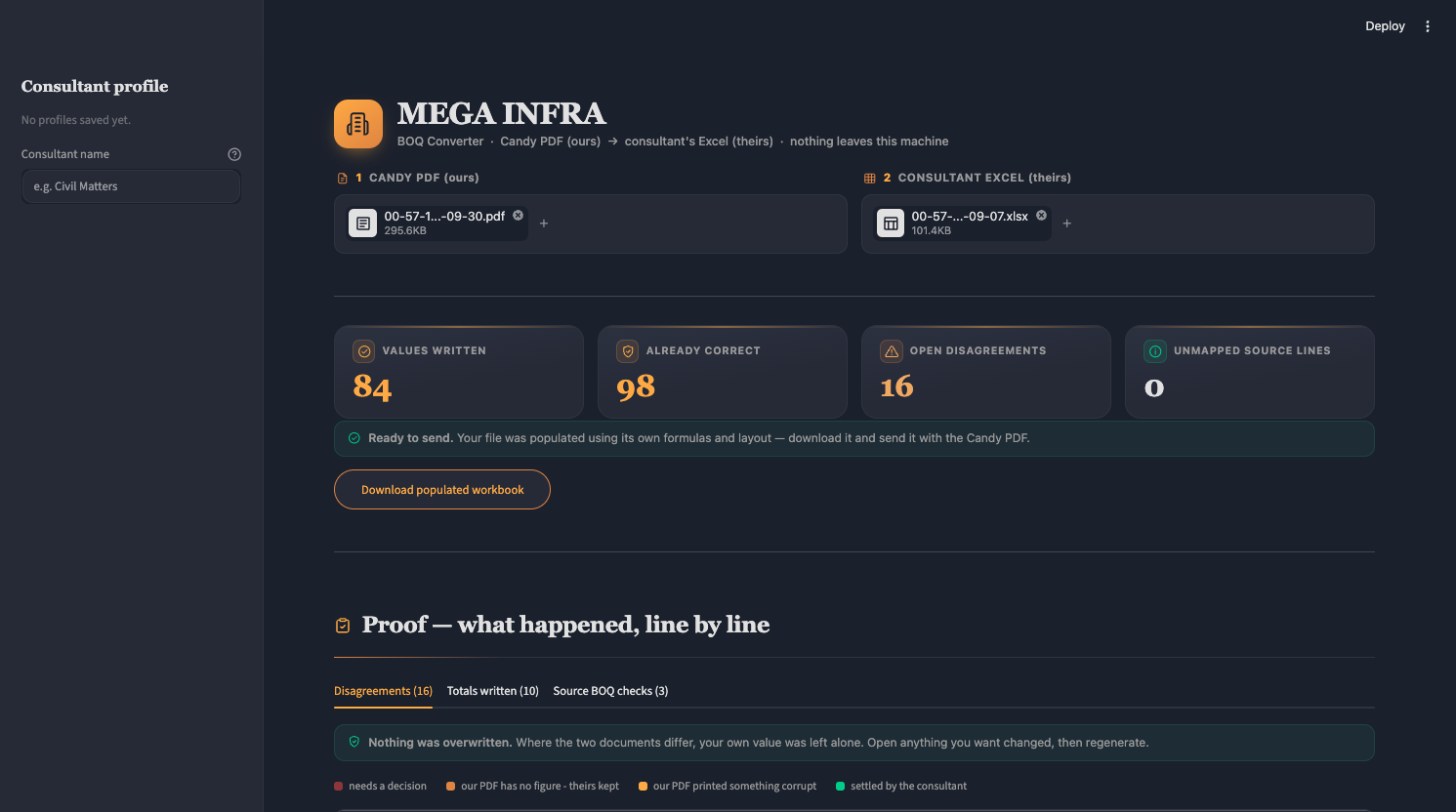
Drop in our Candy PDF and their Excel. Get back their workbook populated, using their own formulas and layout, plus a proof report of exactly what was written, what was already correct, and where the two documents disagree.
Anything you disagree with, you settle in the app and regenerate. The consultant never has to leave the screen.
Runs entirely on your machine. Nothing is uploaded anywhere. The sidebar shows a
build fingerprint — a hash of the .py/.css/.toml actually copied into
the image, computed during the Docker build. It reads e.g. build d7d427a2e770.
A commit SHA was the obvious first choice and was wrong twice over: Coolify
does not pass a commit SHA into a Docker Compose build, so an ARG silently
falls back to dev forever; and a file naming the commit cannot live in the
commit it names, so it could only ever name the parent. A hash of the shipped
files is true by construction and cannot go stale.
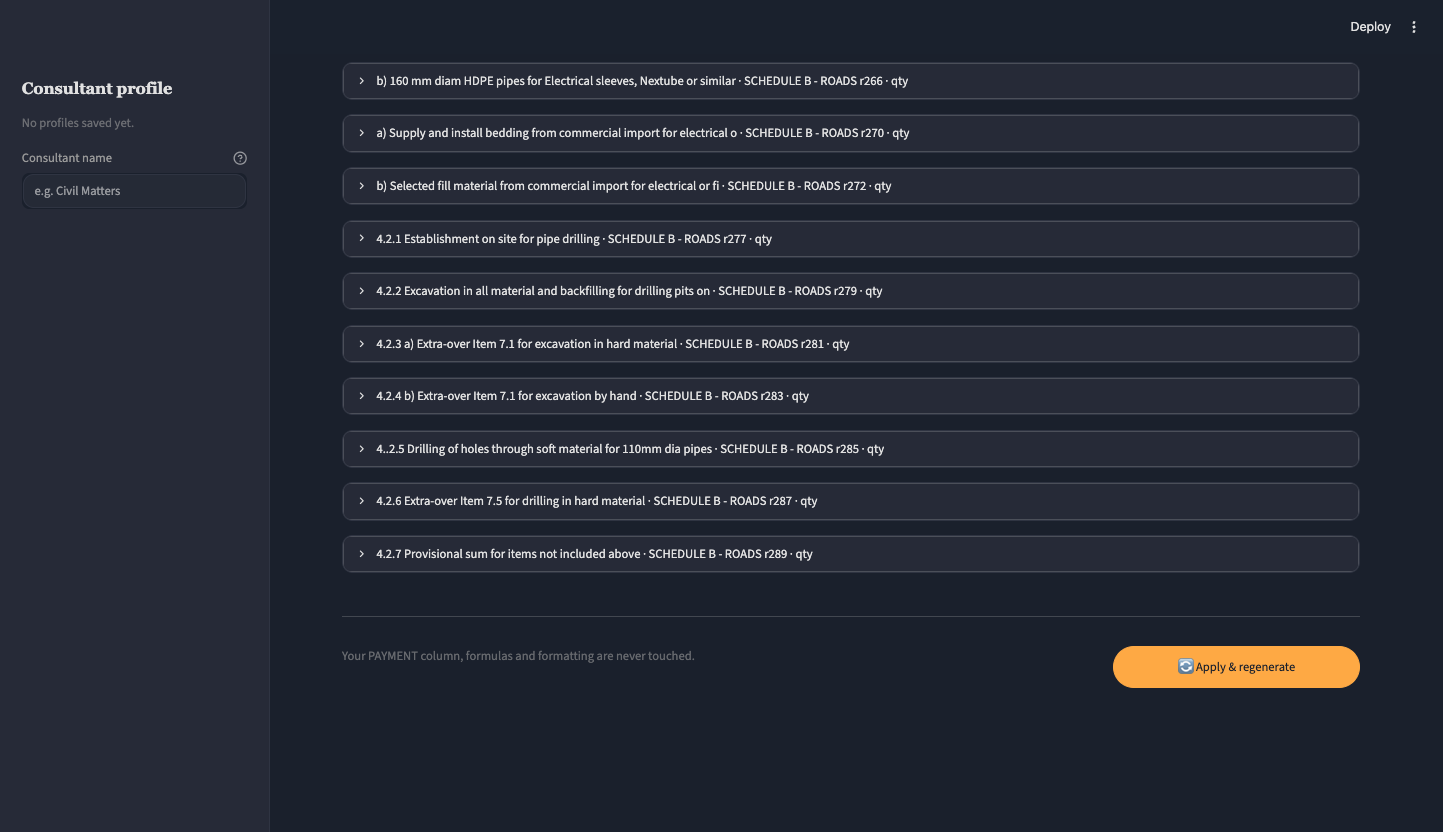
Settling a disagreement in the app
Where the two documents differ, the app writes nothing — your value stands. Each dispute is one collapsed row. Open it and choose:
- Keep yours (as it is) — the default, your file is untouched
- Use our PDF's value — take the figure from the Candy export
- or type a value — anything else, coerced to a number when it looks like one
Press Apply & regenerate and the choices are written straight into the workbook; the row then moves to "settled" and drops off the open list. The PAYMENT column, your formulas and your formatting are never touched.
Design system — MEGA INFRASTRUCTURE
Palette sampled from the dashboard. All tokens live in static/theme.css
as CSS custom properties, so the brand can be retuned in one place without
touching Python.
| group | tokens |
|---|---|
| surfaces | --canvas #1A202C · --topbar #1A212D · --surface #262A37 · --surface-inset #252A36 · --surface-raise #363B49 · --hairline #2F3442 |
| status fills | --success-fill #22383E / --success-edge #1B534A · --warn-fill #3A373C · --danger-fill #3A2D38 |
| accents | --orange #FEA944 · --orange-soft #F1A962 · --orange-deep #DF8441 · --green #00CD8A · --red #F04141 |
| text | --text #E1E1E1 · --text-muted #999999 · --text-warm #B3AC99 · --text-link #00CD8A |
Warm neutrals are deliberate — #E1E1E1 sits on a warm axis and pairs with
#B3AC99; pure #EEEEEE would read cold next to #FEA944.
On the accessibility flag: #F04141 measures 3.77:1 on the card surface, so
it is used only for the severity edge and large marks. Any red text uses
--red-soft #FF6B6B at 5.15:1, which clears AA.
Type is Fraunces for headings and Nunito for body.
Icons are real SVG, not emoji
Thirteen icons live in boq_engine/theme.py as inline SVG — 24x24, 1.75
stroke, round caps, so the set looks drawn by one hand. They inherit
currentColor, so they pick up the palette for free, and being inline they
need no network and no icon font.
They sit in the brand mark, the uploader labels, the KPI tiles, the pills and the section headings — everywhere HTML actually renders.
Not on buttons or tab labels. Streamlit renders those as plain text, so
an inline SVG there leaks to the user as literal <svg …> markup, and emoji
read as emoticons. Those labels are deliberately typographic, which looks
more corporate anyway.
Two implementation notes worth knowing
The stylesheet is injected with st.html, not st.markdown. Markdown
injection duplicated the style block on every rerun, and one malformed
selector silently killed every rule after it — the page rendered unstyled with
no error anywhere. Serving it from static/ was tried and doesn't work:
Streamlit only serves its own hashed assets from that route, and an arbitrary
path falls through to the SPA shell and returns index.html as text/html.
st.html inserts the sheet into the page, isn't iframed, and replaces cleanly.
Buttons and tab labels are plain text. See the icon note above — this is the one place Streamlit refuses to render HTML, and it fails loudly.
Status messages are quiet pills, not alert blocks. A filled
st.warning bar shouts at the reader for something that is background
information. theme.pill() sits at the same volume as the legend it belongs
next to. Genuine errors — source lines that have nowhere to go, subtotals that
do not reconcile — still use real alerts, because those are the thing to act on.
Dispute choices are real Streamlit widgets. Raw HTML <select> was tried
first and silently does nothing — the value never reaches Python, because
st.markdown(unsafe_allow_html=True) has no channel back to session state.
Keys are derived from the cell (choice::<sheet>::<row>::<field>) so a choice
survives a rerun and can be read back to build the override map.
The panel has to be worth reading
An early build reported 160 "disagreements" on Central Towers. Almost none of them were disagreements:
- 147 were the formula guard firing once per row. The consultant's amount
column is a formula on nearly every line, so protecting it was correct
behaviour being reported as "a person must choose". It is now its own quiet
note (
formula), and cannot dilute the findings that need a decision. - 12 were unit formatting:
PC SumvsPCSumvsPC.Sum— the same unit written three ways. Unit comparison now collapses case, spacing and dots, so only genuinely different units are flagged.
160 became 19, and every one of those 19 is real. A panel that cries wolf at 160 teaches people to scroll past it, which is worse than having no panel.
What the 19 actually are, and the ones that matter:
| finding | count | why it matters |
|---|---|---|
| quantity disagreement | 7 | e.g. template 47.5 vs source 95.0 |
| unit mismatch | 11 | m vs m³ on 5 rows — pricing a cubic metre as a linear metre is a serious error, and only a cross-document check catches it |
| source has no quantity | 1 | ours is "Rate only", theirs is real |
The rule that matters most
Where the two documents disagree, the consultant's value is left alone and the difference is reported. The app never overwrites their work to match ours.
Every finding carries a severity decided in the data layer, not guessed from
the sentence text — so a red card always means "a person must choose":
| severity | meaning | on your sample |
|---|---|---|
decision |
the two documents genuinely disagree | 1 — overheads qty 15 000 vs 1 500 000 |
source_gap |
our PDF has no figure; theirs is better | 13 — all of Section 4 |
source_defect |
our PDF printed something corrupt | 2 — the ? litre sign |
resolved |
the consultant settled it in the app | 0 until they do |
note |
worth knowing, no action implied | totals written |
A cell with an override is written instead of left alone, and the dispute drops
to resolved so it stops being flagged.
Two cases where that mattered:
- Candy prints the litre sign as
?. Copying it into their file would have introduced a defect that was not there. Theirℓwas kept. - Our PDF has all of Section 4 as "Rate only" (qty 0) — cable ducts and
directional drilling were never quantified. Their template has real
provisional quantities (100 m³ of trench, 200 m of 110 mm pipe, 70 m of
drilling). Writing our
0would have destroyed better data.
Results on the sample
| Values written | 84 |
| Already correct (verified) | 98 |
| Source lines with nowhere to go | 0 |
| Disagreements reported, none overwritten | 16 |
Their workbook's own COMBINED SUMMARY recomputes to R5,696,934.93 —
matching the Candy PDF's grand total to the cent, through their own formulas
and their own VAT line.
Things the source BOQ gets wrong
Reported, not fixed — these are in the PDF:
- 1.2 Scheduled Time-Related Items — R31,500.00 unexplained. Its priced lines total R1,053,000.00 against a printed R1,084,500.00. Every other 1.2.x line is blank/INCL. Worth a phone call.
- 1.6 Temporary Works — printed total swallows
1.5 Protection of Services(R144,908.18), which the document numbers after it. - 2.1 Earthworks — printed total swallows
2.2 Selected Sub Grade(R146,983.50). - Item
4..2.5(double dot),2.5.4used twice, two sections numberedSECTION 6, units drifting betweenm2/m²/m3/m³/?.
Layout
static/theme.css         design tokens + all styling (edit this to retune)
.streamlit/config.toml   base Streamlit theme colours
boq_engine/extract.py    PDF -> tree            (deterministic, no model)
boq_engine/template.py   layout detect + align + write + totals
boq_engine/validate.py   arithmetic + structure checks
boq_engine/profiles.py   per-consultant template profiles
boq_engine/theme.py      injects the stylesheet, builds finding cards
boq_engine/populate.py   tree -> standalone xlsx + csv
app.py                   Streamlit UI
run.py                   CLI: PDF -> xlsx + csv
How it handles a different template
Two real consultant workbooks have been run through it end to end:
| Blueberry Square | Central Towers | |
|---|---|---|
| source PDF | 11pp, 5 sections | 20pp, 18 sections |
| consultant workbook | 3 sheets, Candy-derived | 53 sheets, SANS 1200 |
| source total reproduced | R5,696,934.93 exact | R38,250,252.60 exact |
| lines written | 83 | 182 |
| already correct | 94 | 159 |
| lines with no home | 1 of 108 | 33 of 226 |
| consultant formulas destroyed | 0 | 0 |
What it takes to cope with a template nobody has seen before:
- Item numbering. Candy prints references three ways -
1.1.1,110...., and a leading-dot.01. All are recognised. A running counter is rebuilt per section, because Candy restarts.01under every repeated heading while the consultant's template numbers them sequentially. - Wrapped headers. A narrow column splits
QUANTITYintoQUAN-/TITY. Both header rows are read and joined, hyphen stripped, or the quantity column is simply never found. - The header lies. On the SANS 1200 template the header advertises DESCRIPTION in column E while the text sits in D - and moves within one sheet. So the description is treated as whatever run of columns sits between ITEM and UNIT, not a single column.
- Numbers are implied, not repeated. A blank item cell still belongs to the number printed above it, so that is carried down. Without it two thirds of the rows read as unnumbered and nothing can match them.
- The pool is cut to what matters. Aligning against all 1314 rows of a 53-sheet workbook makes the aligner cherry-pick; it is restricted to the sheets that own a section named in the source, leaving 499.
The hard guarantee: the consultant's workbook is never damaged. Every cell
that held a formula still holds it. A guard stops each write, and a final pass
re-reads the original and restores anything disturbed, so the promise is
checked rather than intended. On the SANS 1200 template, where quantities are
derived (=G35, =CEILING.MATH(...)), writing a literal over that would
destroy the engineer's model while looking like it worked.
Header rows are not data rows
These sheets repeat their header block partway down a long sheet so a printout stays readable. The repeat sits in the middle of the data:
r65          I='SECTION 1200 A'
r66   DESCRIPTION:  |  CENTRAL TOWERS        <- the app wrote L.Sum 1 5750 here
r67   PAYMENT
r68   REFERS | ITEM NO | DESCRIPTION | UNIT | QUANTITY | RATE | AMOUNT
A scan that finds one header and treats everything after it as data will
happily put a rate on "DESCRIPTION: CENTRAL TOWERS". Any row that scores
like a header, or carries a header marker (description:, payment, refers,
section 1200, …), is now excluded along with the two title rows above it.
This affects every long sheet in the template, not one cell — which is why a single consultant's spreadsheet can show the same fault in a dozen places at once.
Choose the safe failure
A BOQ line is often split across two rows: the label and the first part of the description on one, the figures on the next.
r74   C=.02   The use of equipment referred to in item
r75            110.04.01 above      L.Sum   1.00   =+G75*H75
Leaving those halves as separate candidates caused two distinct faults:
.03 Excavation by hand…put its rate (R764.75) onto.02's row. A wrong figure, in the wrong place, that reads as a perfectly normal price.Carried forwardrows were treated as placeable lines. They carry text in the item column, so the real line above merged down into one and its rate landed on a row that belongs to nothing.
Both are fixed. The figures row now becomes the slot's row — that is where the columns are — and keeps the joined description so matching still sees the whole line. Continuation markers are never placement targets.
This is why the totals look slightly worse and the file is actually better:
| written | unplaced | and the block in question | |
|---|---|---|---|
| before | 196 | 22 | .02 row carried R764.75 — .03's rate, silently |
| after | 191 | 24 | .02 left blank and listed for placement; .03 and .04 correct |
Four more lines need a human; one wrong figure on a tender is worth more than four clicks. A blank is visible and safe. A wrong rate in a neighbouring line is invisible and expensive.
A BOQ row is often two rows
On the SANS 1200 template each line occupies two rows: the one carrying the item number, unit and quantity, and a following row holding the wrapped tail of the description —
r41  C=.04   Appointment of Community Liaison Officer   Month  8  20 000.00
r42          for the duration of the contract period
Left as separate candidates those tails are decoys. The aligner matched
.04 Appointment of Community Liaison Officer to the previous line's tail
and the values landed one row above the label they belonged to — a wrong
figure on a tender document. A row with no item number of its own and nothing
in the priced columns is now joined onto the line above.
Related, and the same root cause twice over: the header claims DESCRIPTION is in column E while the text is in D. That was already handled when matching, but the row classifier still tested column E alone — so row 41 was never counted as a line at all and never became a candidate. Both now use the description run. Central Towers went 192 written / 23 unplaced to 196 / 22, with 4 more genuine disagreements now visible because the values are landing on the right rows.
Tariffs carried inside a sum
Candy sometimes prints a word where a rate would go — INCL, Incl VAT,
PROV — meaning that tariff is included in the sum above rather than priced
separately. Those lines have a quantity but no figure, and they used to arrive
in the consultant's file as blank cells, which read as a failure to pull
through. That is exactly what the engineer reported.
They now carry the source's own wording into the rate cell, and are listed as a note rather than a disagreement:
F15 = 'INCL'    a) Office buildings
F17 = 'INCL'    b) Survey Equipment
The amount column is left alone, because there is genuinely no figure for that line — the money is in the sum above it. 20 of these on the Blueberry pair.
A person decides the rest
The aligner leaves some lines unplaced because nothing scored high enough, and that is the wrong moment to guess — where a description repeats in the document only a person can say which occurrence is which. So the Unplaced tab lists every such line with its best five candidate rows, already ranked and scored:
143.01  Over 1,0 m up to 2,0 m   —   source: 3 500.0 m @ 138.93
    1200DB · row 204 · 143.01 .01 Over 1,0 m up to 2,0 m   [97%]
    1200DB · row 197 · 143.01 Excavate in all materials…    [76%]
    1200LE · row 91  · — .01 Length x 400mm                [47%]
Pick one, or leave it unplaced to keep it out of the workbook. Chosen lines are written on the next run and the same verification gate applies to the result.
The check the writer could not make about itself
Every other verification asks "did the value land in the cell I aimed at?" —
and that is a question the writer answers for itself. So a confidently
misaligned write passes it perfectly: a rate on DESCRIPTION: CENTRAL TOWERS,
one line's rate on its neighbour's row, all invisible.
populate() now records where it placed each line, and the verifier re-reads
that row out of the written file and asks whether it really is that line. The
test is containment, not similarity — a line split across two rows
legitimately puts only a fragment in the cell, and a similarity cut-off
flagged those as errors.
It pays for itself immediately. Run against Central Towers it found 18 misplaced lines, 17 of which had a rate written into the wrong row — the aligner drifts one or two rows inside blocks of near-identical lines like
.02  Over 2,0 m up to 3,0 m
.03  Over 3,0 m up to 4,0 m
Nothing else could see this. Counts were healthy, every write "landed", every formula was intact, and the total reconciled — and 17 rates were still on the wrong lines.
The check is fatal, so the download is removed while this is outstanding. Blueberry passes and is unaffected. Central Towers is currently blocked, which is correct: a file that refuses to download is better than one that quietly prices 17 lines against the wrong descriptions.
The download is gated
Nothing is offered for download until the output file has been read back off disk and checked against the source. It does not trust what the writer believes it did:
| check | fatal? | on Blueberry | on Central Towers |
|---|---|---|---|
| every formula the consultant had is still there | yes | 12 checked, 0 damaged | 3 633 checked, 0 damaged |
| no sheet went missing | yes | 3 → 3 | 53 → 53 |
| every write actually landed in the cell | yes | 70 of 70 | 225 of 225 |
| every source line accounted for | no | 107 of 108 | 193 of 226 |
| nothing replaced without a decision | no | 1 flagged | 6 flagged |
| the workbook's own arithmetic recomputes | no | R6 551 475.17 | R10 627 811.60 |
A failed fatal check removes the download button rather than showing a warning somebody can scroll past. Recalculation needs LibreOffice; when it is absent that check is skipped cleanly and the structural checks stand on their own, which is why the container image does not carry it.
The Verification tab also shows, sheet by sheet, exactly what the app decided about your columns — header row, item, description run, unit, quantity, rate, amount. If a column is wrong you can see it and say so, instead of wondering what the tool assumed.
Known limits
- Central Towers coverage is 90% automatically (203 of 226 lines), with
the remaining 23 surfaced for a human rather than guessed at. The 33 unmatched lines are
reported rather than written somewhere plausible, which is the safe failure —
but it does mean that workbook is not finished. They cluster by section:
200 (9), 143 (7), 141 (4), 142 (4), 146 (3), 110 (2), 190 (2), 170 (1),
plus one
c)sub-line. Sections 141–143 and 200 are where Candy's running.01counter still collides on the same number for genuinely different items, so those need a human to place. - Column bands are tuned for A4 portrait Candy output. A different print layout
needs
BANDSinextract.pyre-measured. - The Central Towers workbook carries external links (
='[9]1200MF'!I56). Those are preserved but will not resolve without the linked file. - Description joins can drop a space where Candy's print engine split a word
(
Fixed-ChargeItems). Cosmetic.
Where the placement check stands
The check is sound — silent on Blueberry, fires on Central Towers — but it has exposed that the alignment drift is not fixed. Fifteen lines on Central Towers are still placed on the wrong row, fourteen of them carrying a value.
A gap-penalty sweep from -0.20 to -1.50 moves it not at all, so this is not the
aligner chasing scores. Both documents contain four separate near-identical
depth-band groups in 1200DB alone, and a single global alignment
distributes them wrongly. Closing that needs a different strategy — anchor on
the confidently matched lines and interpolate within each block, rather than
solving the whole document as one problem.
Until then Central Towers is blocked and will not produce a file. That is the correct behaviour: the app now knows it is wrong and refuses, rather than sending it.